Artificial Intelligence is changing the way students learn. Whether you are in school, college, or preparing for competitive exams, AI tools can help you save time, understand difficult topics, and improve your productivity.
Today, students no longer have to spend hours searching for answers or creating study notes from scratch. The right AI app can explain complex concepts, summarize long chapters, and even generate practice questions, improve writing, and even help with presentations.
In this guide, we will explore the best AI apps for students, their features, benefits, and how to choose the right one for your studies.
Why Students Are Using AI Apps?
Modern education is becoming more digital every day. Students have assignments, projects, online classes, and exams to manage. AI apps make these tasks easier by providing quick assistance whenever needed.
Some common reasons students use AI apps include:
- Saving study time
- Understanding difficult subjects
- Writing better essays
- Creating study notes
- Solving math problems
- Learning new languages
- Improving productivity
- Preparing for exams
The best part is that many AI tools offer free plans, making them accessible to almost every student.
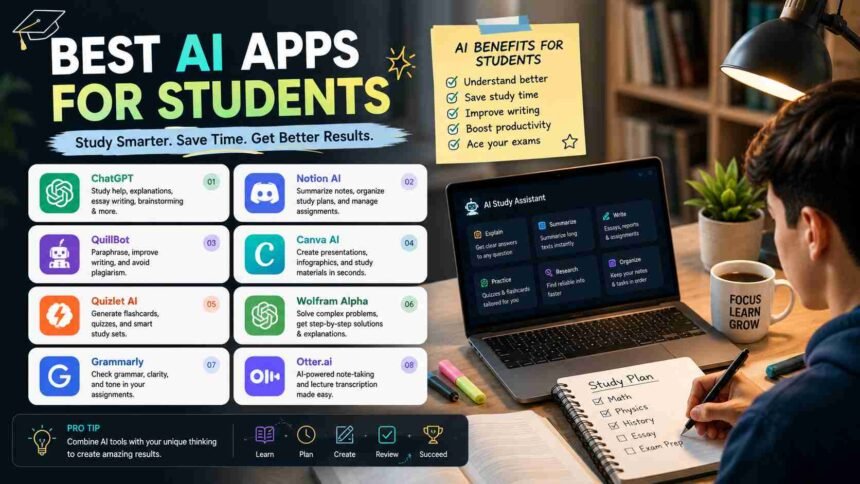
Top AI Apps for Students
Here are some of the most useful AI apps that students can use in 2026.
1. ChatGPT
ChatGPT is one of the most popular AI learning assistants available today. It can answer questions, explain concepts, generate ideas, summarize chapters, and help students prepare for exams.
Best Features
- Explains topics in simple language
- Creates summaries
- Helps with coding
- Generates essays and outlines
- Solves academic doubts
Best For
Students who need help in multiple subjects.
2. Grammarly
Writing assignments becomes much easier with Grammarly. It checks grammar, spelling, punctuation, and sentence clarity.
Instead of simply correcting mistakes, it also suggests better ways to write.
Best Features
- Grammar correction
- Better sentence suggestions
- Tone improvement
- Plagiarism checking (Premium)
- Vocabulary enhancement
Best For
Essay writing and academic assignments.
3. Notion AI
Notion AI combines note-taking with artificial intelligence. Students can organize their study material while generating summaries, action lists, and study plans.
Best Features
- Smart note organization
- AI summaries
- Study planning
- Task management
- Project organization
Best For
Students who want everything organized in one place.
4. Perplexity AI
Perplexity AI is an AI-powered search assistant that provides direct answers along with sources.
This helps students find reliable information without opening dozens of websites.
Best Features
- Fast research
- Source citations
- Easy explanations
- Quick fact checking
Best For
Research projects and assignments.
5. Quizlet AI
Quizlet has been helping students for years, and its AI features make studying even easier.
Students can create flashcards, quizzes, and practice tests automatically.
Best Features
- AI flashcards
- Practice tests
- Learning games
- Revision tools
Best For
Exam preparation.
6. Microsoft Copilot
Microsoft Copilot works inside Microsoft Word, Excel, PowerPoint, and other Office apps.
Students can create presentations, write reports, summarize documents, and organize data more efficiently.
Best Features
- Presentation creation
- Document writing
- Data analysis
- Study planning
Best For
College assignments and presentations.
7. Google Gemini
Google Gemini is another powerful AI assistant that helps students research topics, solve problems, and generate ideas.
Its integration with Google’s services makes studying more convenient.
Best Features
- Quick answers
- Research assistance
- Writing help
- Image understanding
Best For
Daily study support.
8. Photomath
Mathematics becomes less stressful with Photomath.
Students simply scan a math problem, and the app provides step-by-step solutions.
Best Features
- Camera-based problem solving
- Step-by-step explanations
- Multiple solving methods
- Easy interface
Best For
School and college mathematics.
9. Canva Magic Studio
Presentations, posters, and class projects become much more attractive with Canva’s AI tools.
Students can generate designs, presentations, images, and social graphics within minutes.
Best Features
- AI presentation creator
- Image generation
- Poster design
- Video editing
Best For
Creative school projects.
10. Otter.ai
Otter.ai records lectures and converts speech into text automatically.
Instead of writing every word during class, students can focus on understanding the lecture.
Best Features
- Live transcription
- Lecture recording
- Meeting notes
- Searchable transcripts
Best For
College students attending lectures.
Benefits of Using AI Apps for Students
- Better Learning
- Saves Time
- Improves Writing Skills
- Better Exam Preparation
- Personalized Learning
Tips for Using AI Responsibly
AI should support your learning, not replace it.
Follow these simple tips:
- Use AI to understand concepts.
- Verify important facts.
- Write assignments in your own words.
- Avoid copying AI-generated content directly.
- Learn from the explanations instead of depending on ready-made answers.
Using AI responsibly helps you develop real skills while saving valuable time.
Common Mistakes Students Should Avoid
Many students make these mistakes while using AI tools:
- Copying answers without understanding them.
- Trusting every AI response without checking facts.
- Depending completely on AI for homework.
- Ignoring teacher guidelines about AI usage.
- Using too many AI tools instead of mastering one or two.
Remember, AI works best as a learning partner rather than a replacement for your own thinking.
Are AI Apps Safe for Students?
Most popular AI apps are safe when used responsibly. However, students should avoid sharing personal information, passwords, financial details, or confidential school documents.
Parents and teachers should also guide younger students on how to use AI wisely.
Must Read: AI Tools for Remote Workers: 7 Powerful Solutions to Boost Productivity in 2026
Final Thoughts
Artificial intelligence is transforming education, and students who learn how to use these tools wisely can improve both their productivity and learning experience. The best AI apps for students help simplify difficult topics, save time, improve writing, organize study materials, and prepare effectively for exams.
However, AI should always be treated as a study assistant rather than a shortcut. The real learning still comes from understanding concepts, practicing regularly, and applying knowledge on your own. By combining smart study habits with reliable AI tools, students can achieve better results while making learning more enjoyable and less stressful.