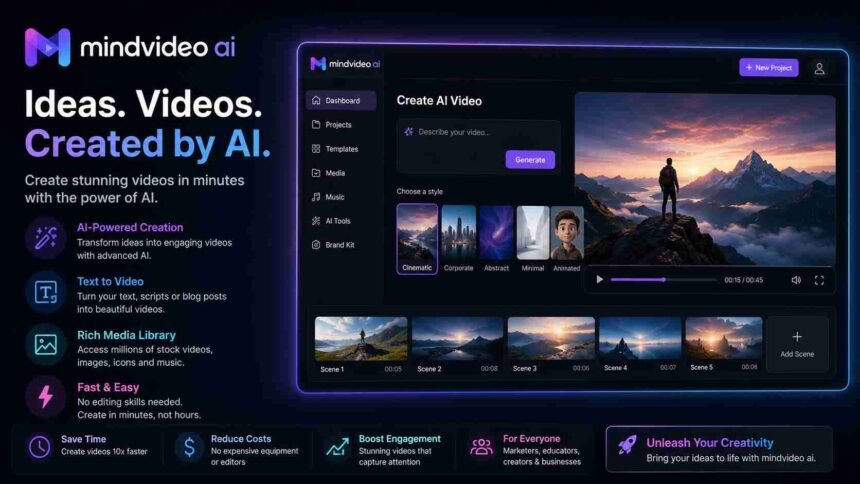
Creating videos used to take hours of editing, expensive software, and creative experience. Today, AI is changing that. With just a simple text prompt, you can generate professional-looking videos in minutes. One tool getting attention in this space is mindvideo ai.
Whether you are a content creator, marketer, business owner, teacher, or social media influencer, this tool promises to make video creation faster and easier From image to video.
In this guide, you’ll learn what mindvideo ai is, how it works, its main features, benefits, pricing, pros and cons, and whether it is worth trying in 2026.
What is MindVideo AI?
MindVideo AI is an AI model high-quality 4k video generation platform that turns text ideas into engaging videos. Instead of spending hours recording, editing, and adding effects, users simply describe the video they want. The AI then creates scenes, animations, voiceovers, transitions, and visuals automatically.
The goal of the platform is simple: help anyone create quality videos without needing professional editing skills.
It can be used for YouTube videos, TikTok, Instagram Reels, marketing ads, educational content, product promotions, presentations, media content and much more.
How Does MindVideo AI Work?
The platform follows a simple process.
Step 1: Enter Your Idea- Type a prompt describing your video.
For example:
“Create a 30-second promotional video for a fitness app with energetic music.”
Step 2: AI Creates the Script– The AI understands your prompt and prepares scenes based on your description.
Step 3: Generate Visuals- It creates AI-generated images, animations, or video clips that match your topic.
Step 4: Add Voice and Music- Choose from different AI voices or upload your own voice. Background music can also be added automatically.
Step 5: Export the Video- Once everything looks good, export your video in just a few clicks. The entire process usually takes only a few minutes.
Top Features of MindVideo AI
1. Text-to-Video and Image-to-Video Generation
This is the main feature. Simply type your idea, and the AI builds a complete video with scenes and transitions.
2. AI Voiceovers
You don’t need to record your own voice. Choose from multiple AI voices that sound natural and professional.
3. Ready-to-Use Templates
The platform offers templates for:
- Social media videos
- Product ads
- Business presentations
- Educational videos
- YouTube Shorts
- Promotional campaigns
Templates save both time and effort.
4. Fast Video Creation
Traditional editing can take several hours. With mindvideo ai, many videos can be created within minutes.
5. AI Script Assistance
If you don’t know what to write, the AI can help generate video scripts based on your topic. This feature is useful for beginners and busy marketers.
6. Stock Media Library
Users can access a collection of images, videos, icons, and graphics without searching different websites.
7. Multiple Export Options
Videos can usually be exported in different resolutions depending on your project requirements.
Who Should Use MindVideo AI?
This tool is suitable for many users.
- Content Creators
- Small Businesses
- Digital Marketers
- Teachers
- Freelancers
Benefits of Using MindVideo AI
Here are some reasons why people are choosing AI video generators.
Saves Time
Videos that once required several hours can now be created much faster.
Beginner Friendly
No editing experience is needed.
The interface is designed for users with all skill levels.
Cost Effective
Hiring video editors can be expensive.
AI tools reduce production costs, especially for startups and solo creators.
Boosts Productivity
You can create multiple videos in a single day instead of working on one project for hours.
Easy Content Scaling
Businesses that publish content regularly can produce more videos without increasing their workload.
MindVideo AI for Social Media Marketing
Social media platforms reward consistent content.
Instead of spending days editing every video, mindvideo ai helps creators publish more often.
It works well for:
- Instagram Reels
- TikTok videos
- YouTube Shorts
- Facebook videos
- LinkedIn content
- Pinterest video pins
This makes it easier to keep your audience engaged while saving valuable time.
Pros and Cons
| Pros | Cons |
|---|---|
| Easy to use | AI videos may still need small edits |
| Fast video creation | Advanced customization can be limited |
| No editing skills required | Internet connection is required |
| AI voiceovers available | Some premium features may require a paid plan |
| Great for beginners | Not ideal for complex movie-style projects |
Tips to Get Better Results with MindVideo AI
To create higher-quality videos, follow these tips.
Write Detailed Prompts
Instead of writing:
“Create a travel video.”
Write:
“Create a 45-second travel video showing beaches, mountains, drone shots, happy families, and relaxing music.”
The more details you provide, the better the results.
Keep Videos Short
Short videos often perform better on social media platforms.
Aim for 30 to 90 seconds when creating promotional content.
Add Your Branding
Include your:
- Logo
- Brand colors
- Website
- Social media handles
This helps your videos look more professional.
Review Before Publishing
Although AI does most of the work, always check:
- Text accuracy
- Voice pronunciation
- Image quality
- Scene order
A quick review can make a big difference.
Is MindVideo AI Good for Businesses?
Yes.
Businesses often need videos for:
- Product launches
- Email marketing
- Website landing pages
- Social media campaigns
- Customer education
- Brand awareness
Instead of relying on a large production team, companies can create quality content much faster using AI tools.
This makes video marketing more affordable for startups and small businesses.
MindVideo AI Pricing
The exact pricing may change over time depending on the subscription plan and available features.
Many AI video platforms generally offer:
- Free trial or limited free plan
- Monthly subscription
- Annual subscription with savings
- Premium plans for businesses and teams
Before purchasing, compare the available plans and choose one that fits your content needs and budget.
Must Read: Best AI Writing Tools Compared: Top Picks for Bloggers in 2026
Is MindVideo AI Worth It?
If you regularly create videos, mindvideo ai can save a significant amount of time.
It is especially useful for creators who want professional-looking videos without learning complex editing software.
While it may not replace advanced video editing tools for large production projects, it performs well for marketing, education, social media, and everyday business content.
For beginners, freelancers, and growing businesses, it offers a practical way to create videos quickly while keeping production costs low.
Final Thoughts
Video content continues to dominate online marketing, and AI is making the process easier than ever. Mindvideo ai gives creators the ability to turn simple ideas into polished videos without spending hours editing or investing in expensive software.
Whether you’re building a YouTube channel, promoting a business, teaching online, or growing your social media presence, this tool can help you create content faster and more efficiently. As AI video technology continues to improve, platforms like MindVideo AI are becoming valuable additions to any content creator’s toolkit.