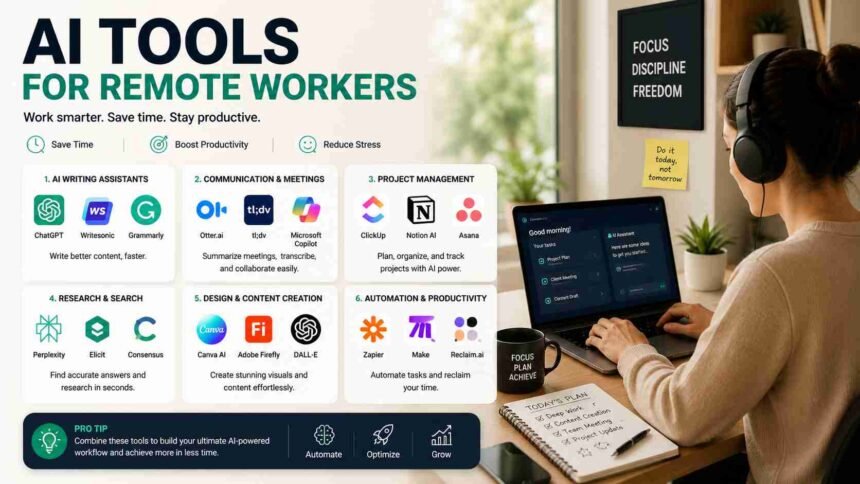
Remote work is no longer a trend. It has become a normal part of modern business. From freelancers and digital marketers to software developers and customer support teams, millions of people now work from home or from different locations around the world.
The biggest challenge, however, is staying productive, organized, and connected. This is where AI tools for remote work are changing everything.
Artificial intelligence is helping remote workers save time, automate repetitive tasks, improve communication, and focus on meaningful work. Whether you work alone or manage a global team, the right AI solutions can boost efficiency and reduce stress.
In this guide, we will explore the best AI tools, their benefits, and how they can transform your remote work experience.
Why AI Is Becoming Essential for Remote Workers
Remote employees often deal with multiple responsibilities at the same time. They attend meetings, write emails, manage projects, create content, and collaborate across different time zones.
AI tools help by handling many routine tasks automatically.
Some major advantages include:
- Better productivity
- Faster communication
- Reduced manual work
- Improved time management
- Enhanced creativity
- Smarter decision-making
Using AI tools for remote work allows professionals to achieve more without increasing their workload.
1. ChatGPT for Writing, Research, and Brainstorming
One of the most useful AI assistants today is ChatGPT.
Remote workers use it for:
- Writing emails
- Creating reports
- Brainstorming ideas
- Summarizing documents
- Preparing meeting notes
- Generating content outlines
Instead of spending hours on repetitive writing tasks, users can complete them in minutes.
The key is to use AI as a support system rather than a replacement for human creativity and judgment.
2. Notion AI for Better Organization
Managing information is one of the biggest challenges in remote work.
Notion AI helps users:
- Summarize long notes
- Generate task lists
- Create project documentation
- Draft content quickly
- Organize team knowledge
Remote teams can keep everything in one place while reducing the time spent on administrative work.
For professionals handling multiple projects, this tool can significantly improve daily efficiency.
3. Grammarly AI for Professional Communication
Clear communication matters even more when teams work remotely.
Grammarly’s AI features help users:
- Fix grammar mistakes
- Improve sentence clarity
- Adjust tone
- Rewrite complex paragraphs
- Create professional emails
This ensures that messages remain polished and easy to understand, especially in international teams.
Strong communication skills combined with AI support create better collaboration and fewer misunderstandings.
4. Otter.ai for Meeting Notes and Transcriptions
Virtual meetings are a major part of remote work.
Remembering every discussion point can be difficult. Otter.ai solves this problem by automatically recording and transcribing meetings.
Benefits include:
- Real-time transcriptions
- Searchable meeting records
- Automatic summaries
- Shared notes for team members
Remote workers can focus on conversations instead of constantly taking notes.
This is one of the most practical AI tools for remote work in modern organizations.
5. Motion AI for Intelligent Scheduling
Time management can become complicated when working across different time zones.
Motion uses artificial intelligence to:
- Plan daily schedules
- Prioritize important tasks
- Automatically adjust calendars
- Reduce meeting conflicts
- Improve focus time
Instead of manually organizing every activity, users receive an optimized work plan based on priorities.
For busy professionals, this can be a major productivity boost.
6. Fireflies AI for Team Collaboration
Fireflies AI is designed to improve remote meetings and collaboration.
Its features include:
- Recording online meetings
- Creating searchable transcripts
- Identifying action items
- Sharing meeting insights with teams
Managers and employees can revisit important discussions whenever necessary.
This eliminates confusion and improves accountability within remote organizations.
7. Canva AI for Fast Visual Content Creation
Remote workers often need presentations, social media graphics, or marketing materials.
Canva’s AI features make design much easier.
Users can:
- Generate presentations quickly
- Create social media posts
- Edit images using AI tools
- Build professional graphics without design skills
The platform saves time while maintaining high visual quality.
For freelancers, marketers, and entrepreneurs, it has become an essential tool.
How AI Improves Productivity in Remote Work
The biggest benefit of AI is not working harder. It is working smarter.
AI helps remote professionals by:
Automating Repetitive Tasks
Routine activities such as email drafting, scheduling, and documentation can consume valuable hours. Automation allows workers to focus on high-impact projects.
Reducing Mental Overload
Managing multiple tasks every day creates stress and fatigue. AI assistants organize information, set priorities, and simplify workflows.
Supporting Better Decision Making
Modern AI platforms analyze data and provide useful recommendations. This enables remote workers to make faster and more informed decisions.
Saving Valuable Time
Even small time savings add up over weeks and months. Using AI tools for remote work can return several productive hours every week.
Challenges of Using AI Tools
Although AI offers many benefits, users should also understand its limitations.
Privacy Concerns
Some tools process sensitive company information. Organizations should always review privacy policies and security practices before adopting AI solutions.
Overdependence on Automation
AI should support human work, not replace critical thinking. Employees must continue using their own judgment and creativity.
Learning Curve
New tools require time and practice.
Teams should invest in training to maximize their benefits.
A balanced approach leads to the best results.
Tips for Choosing the Right AI Tools
Not every AI platform fits every team.
Consider the following factors before making a decision:
Identify Your Biggest Challenges
Determine whether your problems involve communication, scheduling, writing, or project management. The right solution should directly address your needs.
Prioritize Ease of Use
Complex software often creates frustration. Choose tools that are intuitive and easy to implement.
Check Integration Options
The best AI platforms work smoothly with existing tools like email systems, calendars, and collaboration apps.
Start Small
Instead of adopting multiple platforms at once, begin with one or two tools and measure their impact. Gradual implementation usually produces better results.
The Future of Remote Work Is Powered by AI
Artificial intelligence is rapidly becoming a workplace companion rather than just another software category.
Future AI systems will likely:
- Manage complex projects automatically
- Deliver personalized productivity recommendations
- Improve virtual collaboration experiences
- Translate conversations in real time
- Predict workflow bottlenecks before they happen
Remote professionals who learn to work alongside AI today will have a significant advantage tomorrow. The workplace is evolving, and adaptation is becoming more important than ever.
Must Read: Complete Prompt Engineering Guide: Master AI Prompts Like a Pro
Final Thoughts
The rise of remote work has created new opportunities and new challenges. Fortunately, artificial intelligence is helping professionals stay productive, organized, and connected regardless of location.
From writing assistants and meeting transcription platforms to scheduling and design tools, the market offers countless solutions.
The key is to choose technologies that genuinely solve problems and make daily work easier.
By using the right AI tools for remote work, individuals and teams can save time, reduce stress, and achieve better results without sacrificing flexibility.
Smart work, supported by intelligent technology, is shaping the future of modern careers.