Technology is changing the way students learn, and teachers are finding new ways to make lessons more interesting. One of the biggest changes in education today is the use of Artificial Intelligence (AI). It is no longer something only technology experts use. Today, AI is becoming a helpful classroom partner for teachers.
The good news is that AI for teachers is not about replacing educators. Instead, it helps teachers save time, create better learning experiences, and focus more on students rather than paperwork.
In this guide, let’s understand how teachers can use AI in classrooms, its benefits, practical examples, and some important things to remember.
What is AI for Teachers?
AI for teachers means using Artificial Intelligence tools to support classroom activities, lesson planning, assessments, student engagement, and administrative work.
Instead of spending hours creating worksheets or checking assignments, teachers can use AI to complete many routine tasks within minutes.
AI works like a smart assistant. It provides ideas, answers questions, creates learning materials, and even helps personalize education for different students.
Why AI is Becoming Important in Education?
Today’s classrooms are very different from those of ten years ago. Students have access to smartphones, tablets, and online learning platforms. They also expect learning to be more interactive.
Teachers often face challenges such as:
- Large classrooms
- Limited preparation time
- Different learning abilities
- Administrative workload
- Continuous assessments
This is where AI becomes useful. It reduces repetitive work and gives teachers more time to teach, guide, and motivate students.
Benefits of AI for Teachers
Saves Valuable Time
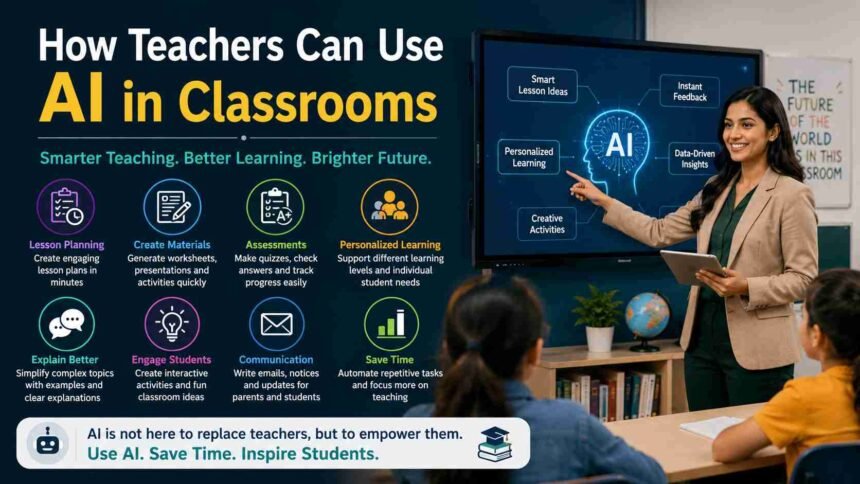
One of the biggest advantages of AI is time saving. Teachers spend many hours preparing lesson plans, making quizzes, writing reports, and checking assignments.
AI tools can help to create:
- Lesson plans
- Worksheets
- Quiz questions
- Classroom activities
- Homework ideas
This allows teachers to spend more time interacting with students.
Makes Lesson Planning Easier
Planning an engaging lesson every day is not easy.
AI can generate lesson ideas based on:
- Student grade
- Subject
- Learning objectives
- Difficulty level
For example, a science teacher can ask AI to prepare an activity on the solar system, while an English teacher can request grammar exercises suitable for middle school students.
Supports Personalized Learning
Every student learns differently. Some students understand quickly, while others need extra support. AI helps teachers to create different learning materials for different skill levels.
For example:
- Easy worksheets for beginners
- Medium-level practice sheets
- Advanced questions for fast learners
This makes learning more comfortable for every student.
Creates Interactive Classroom Activities
Students enjoy learning when lessons are fun.
AI can suggest:
- Classroom games
- Role-play activities
- Debate topics
- Story writing prompts
- Group discussions
- Project ideas
Interactive learning keeps students engaged and improves participation.
Helps in Assessment
Checking hundreds of answer sheets is tiring.
AI can assist teachers by:
- Creating quizzes
- Generating multiple-choice questions
- Checking objective answers
- Giving instant feedback
- Tracking student progress
Teachers still make the final decision, but AI reduces the workload.
Practical Ways Teachers Can Use AI in Classrooms
Create Lesson Plans
Instead of starting from scratch, teachers can ask AI to prepare a lesson outline.
The teacher can then customize it according to classroom needs.
Generate Worksheets
AI quickly creates worksheets for subjects like:
- Mathematics
- English
- Science
- Social Studies
- Computer Science
Teachers can also ask AI to create worksheets based on different difficulty levels.
Prepare Question Papers
Creating balanced question papers requires time.
AI can generate:
- Short answer questions
- Long answer questions
- Multiple-choice questions
- True or False questions
- Case study questions
Teachers can edit these questions before using them.
Improve Classroom Communication
Teachers often send messages to parents.
AI helps write:
- Parent notices
- Homework instructions
- School announcements
- Email drafts
- Event invitations
This makes communication quicker and more professional.
Explain Difficult Topics
Some concepts are difficult to explain in simple language.
Teachers can ask AI to explain topics using:
- Real-life examples
- Stories
- Analogies
- Simple words
This helps students understand faster.
Create Presentations
Instead of spending hours designing slides, teachers can use AI to create presentation content. The teacher only needs to review and make final changes.
Popular AI Tools for Teachers
Many AI tools are designed to make teaching easier.
Some popular options include:
- ChatGPT for lesson planning and content ideas
- Canva AI for presentations and classroom visuals
- MagicSchool AI for education-focused tasks
- Grammarly for improving writing
- Quizizz AI for quizzes and classroom games
- Google Gemini for research and classroom assistance
Each tool has different strengths, so teachers should choose the one that best fits their teaching style.
Best Practices While Using AI
AI is helpful, but it should be used wisely.
Here are a few good practices:
Always Review AI Content
AI can sometimes make mistakes. Teachers should always check facts, examples, and answers before sharing them with students.
Keep Human Creativity
Students learn better through real experiences. AI should support teaching, not replace creativity, discussions, and personal interaction.
Protect Student Privacy
Avoid entering sensitive student information into AI tools. Always follow your school’s privacy policies.
Encourage Critical Thinking
Students should not depend completely on AI.
Teachers should encourage learners to:
- Think independently
- Ask questions
- Solve problems
- Discuss ideas
These skills remain essential.
Challenges of Using AI in Classrooms
Although AI offers many benefits, there are some challenges.
Internet Dependency
Most AI tools require a stable internet connection. Schools with limited internet access may face difficulties.
Learning New Technology
Some teachers may need training before using AI confidently. Fortunately, many AI platforms are designed to be beginner-friendly.
Accuracy Issues
AI is not perfect. It may occasionally generate incorrect information. This is why teacher supervision is always necessary.
Will AI Replace Teachers?
The simple answer is No. Teaching is much more than delivering information.
Teachers inspire students, understand emotions, build confidence, solve classroom problems, and encourage personal growth.
AI cannot replace empathy, experience, classroom management, or human connection. Instead, AI acts as a smart assistant that helps teachers work more efficiently.
Tips for Teachers Starting with AI
If you’re new to AI, start small.
Here are a few simple ideas:
- Use AI to create one lesson plan.
- Generate a classroom quiz.
- Prepare homework activities.
- Create discussion questions.
- Draft parent emails.
- Design interactive learning exercises.
As you become comfortable, you can explore more advanced features.
The Future of AI in Education
AI will continue to improve over the coming years.
Future classrooms may include:
- Personalized learning for every student
- Smart tutoring systems
- AI-powered learning analytics
- Instant language translation
- Voice-assisted learning
- Better accessibility for students with disabilities
Teachers who start learning AI today will be better prepared for tomorrow’s classrooms.
Must Read: AI for Small Business: Smart Ways to Grow Faster and Save Time in 2026
Final Thoughts
Artificial Intelligence is changing education in exciting ways. Rather than replacing teachers, it helps them become more productive, organized, and creative. From lesson planning and assessments to personalized learning and classroom activities, AI for teachers offers practical solutions that reduce workload and improve the learning experience.
The key is to use AI as a supportive tool while keeping the teacher’s knowledge, creativity, and personal connection at the heart of every lesson. When used responsibly, AI can make classrooms more engaging, efficient, and ready for the future.